There’s something oddly entertaining about typing a normal sentence and watching it instantly turn into arrows, stars, smiley faces, hand icons, and strange little symbols. That’s basically the charm of Wingdings. Even after all these years, people still experiment with it for fun, creative projects, retro designs, social media bios, and random internet curiosity. A lot of users eventually ask the same thing: how do you actually type Wingdings characters on a keyboard without copying and pasting symbols from somewhere else? The answer is simpler than most people expect. Wingdings works by replacing regular keyboard characters with symbols through font mapping. Once you understand that system, typing Wingdings becomes much easier. Many people first discover this while testing a <a href=”#”>wingdings translator</a> online and realizing the symbols are connected directly to ordinary keyboard keys. You’ll even find websites that mix symbol tools with printable activities, retro graphics, and places where you can get 20+ dinosaur coloring pages alongside typography resources. The internet has a funny habit of combining completely unrelated things in one place. Still, if you’ve never used symbol fonts before, the process can feel confusing at first. Here’s how it actually works. What Is Wingdings? Wingdings is a symbol-based font created for Microsoft Windows. Unlike regular fonts such as: Wingdings doesn’t display normal alphabet letters visually. Instead, it replaces characters with: The actual keyboard letters remain the same underneath. Only the visual appearance changes. That’s why typing Wingdings characters on a keyboard works differently from typing regular symbols directly. How Wingdings Character Mapping Works Wingdings uses character substitution. For example: The keyboard itself doesn’t change. Instead: This process is called: Once you understand that idea, Wingdings becomes much less mysterious. The Easiest Way to Type Wingdings Characters The simplest method is: That’s it. Your keyboard still inputs ordinary characters, but the font displays symbols instead of letters. Example Typing: might display: This is the most common way people type Wingdings characters on a keyboard in Microsoft Word and similar programs. How to Use Wingdings in Microsoft Word Microsoft Word remains one of the easiest places to use Wingdings. Step-by-Step Instantly, your keyboard characters transform into symbols. People often use this for: Honestly, it still feels oddly satisfying even now. Typing Wingdings Symbols With Alt Codes Another method involves keyboard shortcuts called Alt codes. These work mainly on Windows systems. How Alt Codes Work The system inserts a special character or symbol. Some Wingdings-related symbols can appear this way depending on: Common Examples Not every Wingdings symbol uses a direct Alt code, though. Many still rely on switching the actual font. Using Character Map for Wingdings Symbols Windows includes a built-in utility called Character Map. This tool lets you: How to Open Character Map You’ll see all available symbols displayed in a grid. This method helps when: Common Wingdings Keyboard Symbols Some Wingdings symbols became extremely popular over the years. Frequently Used Icons Many users remember these from: They were surprisingly practical before modern emoji systems became common. Why Wingdings Typing Feels Different Typing Wingdings feels unusual because: Regular typing feels logical because letters match keys directly. Wingdings requires symbolic interpretation instead. That weirdness is part of why people still experiment with it. Can You Type Wingdings on Mac? Yes, though support varies slightly. Mac users can: Some older classic Wingdings behavior worked more naturally on Windows because Microsoft originally designed the font for that environment. Still, modern Macs can display many Wingdings-style symbols without much trouble. Typing Wingdings on Mobile Devices People also search for ways to type Wingdings characters on a keyboard using phones or tablets. Mobile devices handle symbol fonts differently. Most users rely on: Direct classic Wingdings keyboard support is less common on mobile systems. Still, many online converters make the process simple enough. Online Wingdings Keyboard Tools Some websites function almost like virtual Wingdings keyboards. You type ordinary text, and the tool: These tools are useful because: Many users prefer online tools instead of memorizing keyboard mappings. Copy and Paste Wingdings Symbols Honestly, this is probably the most common modern method. People often: This works especially well for: Even users who understand keyboard mapping still use copy-paste shortcuts because it’s faster. Why Some Symbols Don’t Display Correctly This happens because Wingdings depends on font support. If: then symbols may: Modern Unicode symbols solve this problem more reliably, which is why many symbol generators now use Unicode replacements instead of classic Wingdings glyphs. Wingdings vs Unicode Symbols This difference matters. Wingdings Unicode Symbols Unicode symbols work more consistently across: Classic Wingdings still survives mostly because of nostalgia and creative typography. Using Wingdings for Creative Design People continue using Wingdings for: There’s something playful about transforming ordinary text into symbols. It feels experimental in a way modern clean design sometimes doesn’t. Safety Tips for Wingdings Tools Most Wingdings tools are harmless, but basic caution still helps. Avoid Suspicious Downloads You usually don’t need software installation. Use Trusted Websites Simple browser tools are generally safer. Don’t Install Random Keyboard Extensions Many aren’t necessary. Watch for Fake Download Buttons Some low-quality sites overload users with ads. Personally, I’d stick with lightweight online converters whenever possible. Why People Still Search for Wingdings Fonts A lot of users looking for <a href=”#”>wingdings fonts</a> aren’t trying to do anything technical. Most are simply: There’s also nostalgia involved. People remember accidentally switching fonts in Microsoft Word years ago and suddenly seeing their homework transform into strange icons. That weird moment stuck with people. Pros of Typing Wingdings Characters Fun Visual Style Symbols feel playful and different. Useful Decorative Elements Arrows and check marks still work well. Easy to Experiment With No advanced skills required. Great for Creative Projects Perfect for quirky typography. Nostalgic Appeal Older computer users recognize the style instantly. Cons and Limitations Hard to Read Long symbol strings become confusing quickly. Font Compatibility Issues Not every system supports Wingdings equally. Accessibility Problems Screen readers may struggle. Limited Practical Communication Wingdings works better decoratively than functionally. Still, most people use
Do Wingdings Translators Work on Mobile Devices?
Wingdings has managed to survive far longer than most people expected. What started as a quirky Microsoft symbol font somehow turned into a lasting internet curiosity. People still use it for decorative text, social media bios, retro graphics, hidden-looking messages, and random creative projects that honestly make the internet feel more fun sometimes. Lets uncover Do Wingdings Translator Work on Mobile Devices? One thing users ask pretty often now is whether Wingdings translator work on mobile devices the same way they do on desktop computers. That’s a fair question because mobile phones handle fonts differently than older Windows systems did. Some symbols display correctly. Others turn into blank squares, weird replacements, or broken formatting. A lot of users first discover these tools through a wingdings translator website while browsing on their phones. Then they start testing random phrases just to see what symbols appear. Somewhere along the way, they also end up on creative websites offering retro font tools, printable activities, and places where you can get 20+ dinosaur coloring pages along with symbol generators and puzzle sheets. The internet has always been oddly good at combining unrelated hobbies. The short answer is yes — Wingdings translators usually work on mobile devices. But there are some important details that explain why the experience isn’t always identical across phones, tablets, and apps. What Is a Wingdings Translator and Do Wingdings Translator Work on Mobile Devices? A Wingdings translator is a tool that converts regular text into symbol-based characters using Wingdings font mapping. Instead of displaying normal letters, the translator replaces them with: The process is based on: Most modern translators work directly inside web browsers without requiring downloads. That’s one reason Wingdings translator work on mobile devices more easily now than they would have years ago. Why Mobile Compatibility Matters Older symbol fonts were originally designed for desktop systems, especially Microsoft Windows. Back then: Mobile operating systems changed that environment. Now users access content through: Each system handles fonts differently. That’s why mobile compatibility became a major issue for Wingdings-style symbols. Do Wingdings Translators Actually Work on Phones? Yes, most modern ones do. If you open a browser-based Wingdings converter on: the tool itself usually works normally. You can: The real challenge isn’t the translator itself. It’s whether the symbols display correctly across apps and devices afterward. That’s the important distinction when discussing whether Wingdings translator work on mobile devices consistently. Why Some Wingdings Symbols Don’t Display Properly Classic Wingdings depends heavily on font support. If a device doesn’t support the font properly, symbols may: This happens because: That’s why modern text-to-symbol generators often use Unicode alternatives instead of relying purely on classic Wingdings fonts. Android Wingdings Support Android devices generally handle many symbols reasonably well, especially when: Still, compatibility varies between: Some users notice: Honestly, Android fragmentation affects all kinds of fonts and symbols, not just Wingdings. iPhone Wingdings Compatibility iPhones typically display Unicode symbols more consistently than classic Wingdings glyphs. That’s because Apple relies heavily on: Classic Wingdings fonts themselves may not always appear exactly as intended. Still, many online translators convert symbols into mobile-friendly alternatives automatically. That’s one reason Wingdings translator work on mobile devices better now than during earlier smartphone years. Why Unicode Matters on Mobile Unicode changed almost everything about symbol compatibility. Older Wingdings systems relied on: Unicode introduced: Many modern “Wingdings-style” generators now: This hybrid approach helps symbols display more reliably across: Browser-Based Wingdings Translators Most users now access Wingdings tools directly through mobile browsers. These tools usually work well because: A clean browser-based converter is often safer and more reliable than downloading random symbol apps. Personally, I’d rather use a simple web tool than install some strange “ultimate symbol converter app” from an unknown source. Can You Copy and Paste Wingdings Symbols on Mobile? Usually yes. Most mobile users: This works fairly well for: Still, pasted symbols sometimes change depending on: That inconsistency is one of the biggest limitations of mobile symbol fonts. Social Media Apps and Wingdings Symbols Many people use Wingdings-style symbols for: Platforms like: usually support at least some symbol characters. But classic Wingdings rendering itself may vary. That’s why many generators intentionally convert symbols into Unicode-friendly formats instead. Why Some Apps Break Wingdings Formatting Certain apps simplify or replace unsupported fonts automatically. This can cause: Messaging apps especially may: The more decorative the symbol set becomes, the more likely formatting problems appear. Mobile Wingdings Converter Apps There are actual apps designed for: Some are harmless.Others are overloaded with ads. When trying mobile Wingdings tools, avoid apps that: A lightweight online converter is usually enough. Safety Tips for Mobile Wingdings Tools Most translators themselves are harmless, but basic caution still helps. Use Trusted Websites Simple, clean tools are generally safer. Avoid Random APK Downloads Unknown app files create unnecessary risk. Don’t Grant Weird Permissions A text converter shouldn’t need: Keep Browsers Updated Modern browsers improve font compatibility and security. Watch for Fake Download Buttons Some low-quality sites use misleading ads. This matters because people asking whether Wingdings translator work on mobile devices often end up trying random websites quickly without checking quality first. Why Mobile Devices Handle Fonts Differently Phones prioritize: Older desktop systems allowed more flexible local font behavior. Mobile operating systems streamlined many font systems for efficiency. That’s why: Wingdings survived mostly through symbol conversion tools rather than native mobile font installation. Tablets and Wingdings Support Tablets usually behave similarly to smartphones. Most browser-based translators work fine on: Larger screens often improve: Some users actually prefer using symbol generators on tablets because the layout feels less cramped than phones. Pros of Using Wingdings Translators on Mobile Easy Access No desktop computer required. Fast Symbol Generation Most tools work instantly. Good for Social Media Decorative bios and captions remain popular. No Downloads Needed Browser-based tools reduce complexity. Portable Creativity You can experiment anywhere. Cons and Limitations Font Compatibility Issues Not all symbols display correctly everywhere. App Rendering Differences Some platforms change formatting. Limited Native Font Support Phones rarely include
What Is the Difference Between Wingdings and Webdings, and Symbol Fonts?
If you’ve ever changed a font in Microsoft Word and suddenly watched your sentence turn into arrows, clocks, smiley faces, or strange icons, there’s a good chance you ran into Wingdings or Webdings. For a lot of people, those fonts feel oddly nostalgic. They remind us of old Windows computers, early internet culture, school computer labs, and the weird joy of accidentally discovering hidden-looking symbols inside normal text. So, lets uncover Difference Between Wingdings and Webdings, and Symbol Fonts? But many users still get confused about the actual difference between Wingdings, Webdings and other symbol fonts. At first glance, they all look similar. They replace letters with symbols, icons, and decorative characters. Yet each font was designed differently and served slightly different purposes. That’s why people still search for wingdings translator 2026 tools and symbol charts today. Some are curious about hidden meanings. Others simply enjoy experimenting with retro typography. You’ll even come across creative websites offering font generators, printable puzzles, and places where you can get 20+ dinosaur coloring pages alongside old-school symbol resources. The internet mixes creativity in funny ways sometimes. The truth is, Wingdings, Webdings, and Symbol fonts each came from different stages of digital typography history. Once you understand their origins, the differences become much clearer. What Are Symbol Fonts? Before comparing Wingdings and Webdings directly, it helps to understand what symbol fonts actually are. A symbol font replaces regular letters and numbers with: Instead of displaying the alphabet normally, these fonts map keyboard characters to visual glyphs. For example: These fonts are often called: They became especially useful during the early days of desktop publishing and Microsoft Office software. What Is Wingdings? Wingdings is a Microsoft symbol font introduced in the early 1990s. The font contains: Microsoft included Wingdings with Windows and Microsoft Office, which helped it spread quickly across millions of computers. The main purpose of Wingdings was practical: At the time, that was genuinely helpful because design tools were much more limited than they are now. What Is Webdings? Webdings came slightly later. Microsoft introduced Webdings in 1997 as another symbol-based font, but this one focused more heavily on web-style icons and interface graphics. Compared to Wingdings, Webdings included more: This reflected the growing importance of the web during the late ‘90s. The internet was expanding rapidly, and digital communication styles were changing. Webdings matched that newer visual environment more closely. The Main Difference Between Wingdings and Webdings: The biggest difference between Wingdings, Webdings comes down to design style and symbol focus. Wingdings Webdings Wingdings feels more random and decorative.Webdings feels slightly more structured and interface-oriented. Honestly, Wingdings has more personality. Webdings feels a little more functional. Why Do Wingdings and Webdings Look Different? This mostly comes from the design goals behind each font. Wingdings was created during an era focused heavily on: Webdings arrived later, when: became increasingly important. That shift influenced the types of symbols included in each font. So if someone asks about the difference between Wingdings, Webdings, the historical context matters quite a bit. Symbol Font Differences in Character Mapping Both fonts rely on character mapping systems. Each keyboard character corresponds to a specific symbol inside the font. For example: The underlying character code stays the same. Only the glyph representation changes. This process is called: That’s why text can instantly transform when you switch fonts. Wingdings Symbols vs Webdings Icons The visual style of the symbols also differs noticeably. Wingdings Symbols Often include: Webdings Icons More commonly include: Webdings feels closer to early website design language. Wingdings feels more like a playful collection of random visual symbols. The Symbol Font Called “Symbol” This is where people often get confused. There’s also a font literally named “Symbol.” Unlike Wingdings and Webdings, the Symbol font focuses mostly on: So while Wingdings and Webdings are decorative symbol fonts, Symbol serves more academic and technical purposes. For example: appear frequently inside the Symbol font set. That’s another important difference between Wingdings, Webdings and Symbol fonts overall. Why Microsoft Created Multiple Symbol Fonts Microsoft wasn’t trying to confuse people. Different fonts solved different design problems. Wingdings Focused on decorative document symbols. Webdings Focused on web-era interface graphics. Symbol Focused on scientific and mathematical notation. At the time, computers lacked many built-in visual resources modern users now take for granted. Today we have: Back then, fonts handled much of that work. Which Is Better: Wingdings or Webdings? Honestly, it depends on what you want. Wingdings Is Better For: Webdings Is Better For: A lot of designers still prefer Wingdings because it feels more recognizable and visually weird in a charming way. Webdings looks more practical but slightly less memorable. Are Wingdings and Webdings Still Used Today? Yes, though mostly for: You’ll still find people using: Creative websites often combine these with printable activities where users can also grab 20+ dinosaur coloring pages and puzzle sheets alongside typography resources. That strange mix somehow feels very internet-like. Why Symbol Fonts Became Popular The popularity of symbol fonts came from convenience. Users could quickly add: without needing image editing software. During the early Windows era, that mattered a lot. Graphic design tools were slower, more expensive, and less accessible to everyday users. Symbol fonts gave ordinary people visual communication tools directly from the keyboard. Problems With Wingdings and Webdings Even though they became iconic, these fonts had limitations. Compatibility Issues Not all systems displayed the fonts correctly. Accessibility Problems Screen readers struggled with symbol-heavy text. Confusing Messages Long symbol strings became unreadable quickly. Font Dependency If the font wasn’t installed, symbols could break or display incorrectly. This became more noticeable as internet communication expanded. Unicode Changed Everything Modern Unicode systems eventually replaced much of what symbol fonts used to do. Unicode introduced: That made communication more consistent across: Wingdings and Webdings now feel more nostalgic than essential. Still, they influenced modern digital design more than people realize. The Lasting Influence of Symbol Fonts The history of symbol fonts helped shape: Modern apps constantly use icons now:
What Are the Most Commonly Used Wingdings Symbols and Their Meanings?
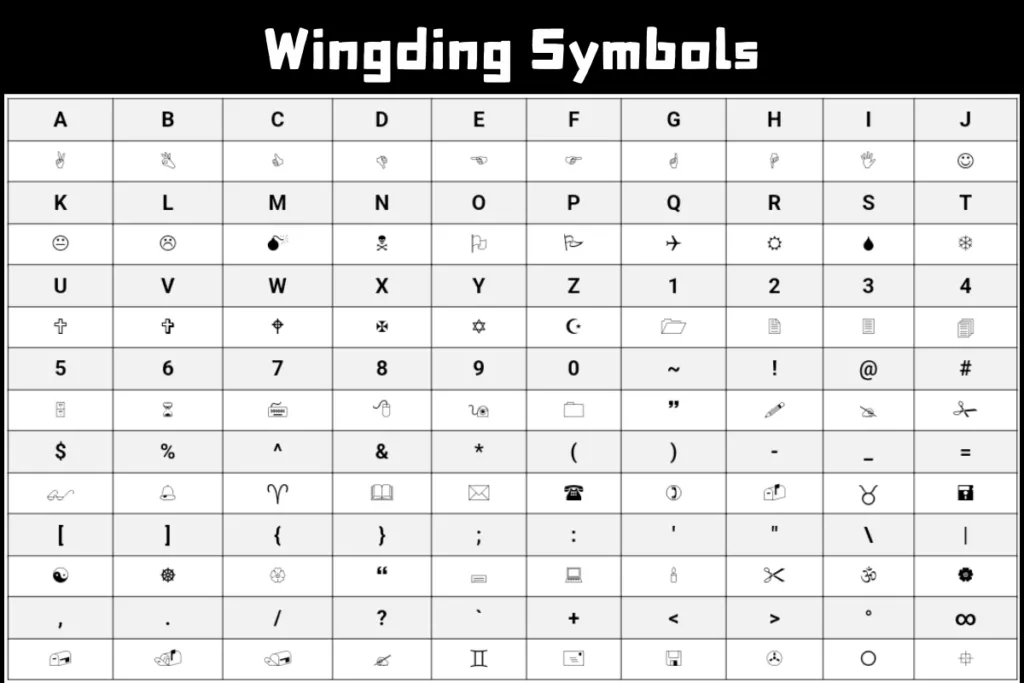
Wingdings is one of those fonts people never completely forget. Even if you haven’t used it in years, there’s a good chance you still recognize those strange little symbols the second they appear on screen. Arrows, smiley faces, hand gestures, envelopes, stars, telephones, somehow they all became part of internet culture, old Microsoft Word memories, and retro computer nostalgia at the same time. So, lets uncover What Are the Most Commonly Used Wingdings Symbols and Their Meanings? A lot of people discover Wingdings through memes or online symbol tools, then eventually start wondering about the actual meanings behind the icons. Some symbols seem obvious. Others look completely random until you learn what they were originally designed for. That curiosity is why searches for Best wingdings translator tools and symbol charts still happen every day. People enjoy decoding the symbols, experimenting with text conversion, and honestly just seeing what weird characters appear. You’ll even find creative websites that combine symbol generators with printable activities where you can get 20+ dinosaur coloring pages alongside retro font resources and puzzles. The interesting part is that many common Wingdings symbols were originally created for practical office and document use, not internet mysteries. Once you understand the history behind them, the font makes a lot more sense. What Is Wingdings? Wingdings is a symbol-based font developed for Microsoft Windows in the early 1990s. Instead of displaying normal alphabet letters, the font replaces keyboard characters with symbols and pictographic icons. For example: The underlying character still exists, but the font changes how it appears on screen. That’s why Wingdings is considered a dingbat font rather than a language. Why People Search for Wingdings Symbols and Their Meanings Part of the fascination comes from how mysterious the symbols look. Rows of icons naturally make people wonder: The truth is much simpler than internet rumors suggest. Most Wingdings icons were designed for: Still, learning about Wingdings symbols and their meanings can actually be pretty fun because the icons reflect an older era of computer design. The Most Common Wingdings Symbols Some symbols appear far more often than others. These became recognizable because people used them in: Here are some of the most commonly used Wingdings characters and what they typically represent. Arrow Symbols in Wingdings Arrows are probably the most practical symbols in the entire font. Common Meanings People used arrow symbols heavily in: Even today, arrows remain one of the most useful symbol categories in digital design. Some Wingdings arrows look simple, while others feel oddly decorative compared to modern minimalist icons. Honestly, older computer icons had more personality sometimes. Check Mark Wingdings Symbols The check mark became one of the most recognizable Wingdings icons ever created. Typical Uses Back in older versions of Microsoft Word, many users inserted check marks through Wingdings because there weren’t as many built-in symbol tools available. That practical use explains a lot about Wingdings symbols and their meanings overall. Many symbols existed primarily to help organize documents visually. Smiley Face Wingdings Characters Before emojis became standard everywhere, Wingdings smiley faces helped people add emotion to digital text. Common Meanings Some older internet users still remember using Wingdings smileys in: Modern emojis eventually replaced most of these uses, but the connection between symbols and emotional communication started much earlier than many people realize. Hand Symbols Wingdings Hand icons became surprisingly popular because they worked well as visual pointers. Common Hand Symbol Meanings Teachers and office workers often used hand symbols inside printed documents to draw attention to important sections. Some people also used them decoratively in social media bios once copy-paste symbol generators became popular. Star Symbols Wingdings Stars always stand out visually, which explains why they became common in typography. Typical Meanings Wingdings includes several star variations: These symbols appeared frequently in: Telephone Symbol Wingdings The classic telephone icon reflects an older era of office communication. Common Uses It’s funny looking back now because many younger users recognize smartphone icons more easily than traditional phone receiver symbols. Still, the telephone remains one of the most recognizable Wingdings icons. Envelope Icon Wingdings The envelope symbol became associated with: Before email icons became standardized across apps and websites, Wingdings envelope symbols helped users visually represent communication inside documents. This symbol later influenced many digital interface designs people still use today. Zodiac Symbols in Wingdings Some Wingdings character sets included zodiac-style symbols and astrology-related icons. Common Associations These weren’t necessarily practical office symbols, but they added visual variety to the font collection. Internet users especially loved experimenting with zodiac symbols during the early web era. Why Wingdings Symbols Became Popular The popularity of Wingdings symbols and their meanings came from accessibility. Millions of Windows computers included the font automatically. That meant ordinary users suddenly had instant access to visual symbols without needing design software. At the time, that was genuinely useful. People could quickly add: directly into documents using only their keyboards. Wingdings and Early Internet Culture The internet helped transform Wingdings from a practical office font into something more cultural. People started using the symbols for: Some viral rumors even claimed certain symbol combinations predicted events or contained hidden messages. Most of those stories were exaggerated coincidences, but they made the font feel mysterious. That mystery still drives interest in Wingdings symbols and their meanings today. Wingdings Symbol Chart and Character Mapping Every Wingdings symbol connects to a keyboard character through character mapping. For example: The process relies on: That’s why online tools can: The system is visual rather than linguistic. Why Some Symbols Feel Outdated A few Wingdings icons clearly reflect older technology and design trends. Examples include: That older visual style actually contributes to the font’s nostalgic appeal now. Modern design tends to look cleaner and flatter. Wingdings feels more playful and experimental. Common Uses for Wingdings Symbols Today People still use Wingdings symbols regularly in: Creative websites often pair symbol tools with activity downloads where users can also grab 20+ dinosaur coloring pages, printable games, and retro design assets.
Why Wingdings Font Originally Created by Microsoft?
If you’ve ever opened an old Microsoft Word document and accidentally changed the font to Wingdings, you probably remember the confusion. Normal text suddenly turns into arrows, hand signs, clocks, smiley faces, and strange little symbols that make your sentence look like a puzzle from an old computer game. So, lets dicuss in detail Why Wingdings Font Originally Created by Microsoft? For years, people treated Wingdings like some mysterious hidden code. Internet rumors made it even stranger. But the real story behind the font is actually tied to the early days of personal computers, desktop publishing, and the need for simple visual symbols inside documents. A lot of people searching for a latest wingdings translator eventually end up wondering the same thing: Why Wingdings font originally created by Microsoft in the first place? It wasn’t designed as a secret language or conspiracy tool. It had a very practical purpose during a time when computers handled typography very differently than they do now. You’ll even notice many creative typography sites discussing Wingdings also include printable resources, retro fonts, and places where you can get 20+ dinosaur coloring pages alongside symbol tools and graphic assets. The internet tends to combine creativity in strange ways, honestly. The Early Days of Computer Typography To understand Why Wingdings font originally created, you have to picture what computers looked like in the late 1980s and early 1990s. Modern systems now include: Back then, things were much more limited. Computers mainly focused on plain text. If users wanted visual symbols inside documents, they often had very few options. Designers and office workers still needed: That gap created demand for symbol-based typography. What Exactly Is Wingdings? Wingdings is a dingbat font created for Microsoft Windows. A dingbat font replaces regular letters and numbers with symbols instead of standard alphabet characters. For example: The underlying keyboard characters stay the same, but the font changes how they appear visually. That’s why Wingdings became known as a symbol font rather than a language. Why Microsoft Needed Wingdings The answer to Why Wingdings font originally created comes down to usability and visual communication. Microsoft wanted users to have quick access to symbols without needing separate graphics software. At the time, desktop publishing was becoming more popular. Businesses, schools, and home users were creating: People wanted visual elements inside documents, but inserting graphics was much harder than it is now. Wingdings solved that problem by turning keyboard characters into instant symbols. Instead of drawing icons manually, users could: That was genuinely useful in early office software. The Designers Behind Wingdings The history gets even more interesting when you look at the creators. Wingdings was developed by typographic designers: These designers were already respected in digital typography circles before Wingdings became famous. Their work focused heavily on: Microsoft later distributed Wingdings widely through Windows and Microsoft Office, which is why millions of users suddenly had access to it. The font quickly became one of the most recognizable symbol fonts ever made. The Meaning Behind the Name “Wingdings” The word “wingding” actually existed before the font. Historically, “wingding” referred to: The font name matched its playful and symbol-heavy style. It wasn’t meant to sound serious or technical. And honestly, that playful identity helped people remember it. How Wingdings Worked Technically Part of understanding Why Wingdings font originally created involves looking at how fonts worked during that era. Every keyboard character has a code. Standard fonts display: Wingdings reassigned those codes to symbols. For example: This process is called: It allowed users to generate visual icons directly from their keyboards. At the time, that was pretty clever. Why Symbol Fonts Were Useful in Microsoft Word Microsoft Word played a huge role in Wingdings becoming popular. People used the font for: Back then, inserting graphics wasn’t always smooth or fast. Symbol fonts saved time. Need arrows in a document?Switch to Wingdings. Need check marks?Wingdings again. Need quick icons for a presentation slide?Still Wingdings. It became a practical shortcut for document formatting. Wingdings and the Rise of Desktop Publishing The late ‘80s and early ‘90s saw huge growth in desktop publishing. Regular users suddenly gained access to tools previously limited to professional designers. People started creating: Visual design mattered more than ever. The creation of Wingdings supported that movement by giving users fast access to decorative symbol fonts without requiring advanced graphic design skills. That explains a major part of Why Wingdings font originally created in the first place. Why People Thought Wingdings Was Secret Code This happened mostly because the symbols looked mysterious. Humans naturally search for meaning in visual patterns. When people saw rows of strange icons replacing letters, they assumed there might be hidden messages behind them. Then internet culture amplified the mystery. Certain word combinations produced symbol patterns that looked oddly dramatic, and conspiracy theories spread online. Most were coincidences or exaggerated interpretations. The truth is simpler:Wingdings was designed for visual typography, not secret communication. Wingdings Was Never Intended as a Language This is one of the biggest misconceptions online. Wingdings is not: It’s simply a decorative font. The symbols don’t carry structured grammar or vocabulary rules. They’re visual substitutions tied to keyboard characters. That distinction matters when discussing Why Wingdings font originally created because Microsoft’s goal was practical document styling, not communication theory. Why Wingdings Became So Popular A few reasons helped Wingdings explode in popularity. It Came Preinstalled Millions of Windows computers included it automatically. It Was Easy to Use Users only needed to switch fonts. The Symbols Felt Fun The icons looked playful and unusual. Early Internet Culture Loved Weird Things Honestly, the internet has always loved strange little discoveries. People experimented constantly with fonts, hidden-looking messages, and quirky formatting tricks. Wingdings fit perfectly into that culture. The Difference Between Wingdings and Modern Emojis You can think of Wingdings as an early ancestor of modern emoji systems in some ways. Both use visual symbols for communication and decoration. But technically they work differently. Wingdings Emojis Back when Wingdings was created,
Can I Use Wingding Symbols in Social Media Posts or Documents?
Wingdings has been around for decades, but people still use it in surprisingly creative ways. You’ll spot strange symbols in Instagram bios, decorative icons in presentations, quirky captions on TikTok, and even old-school document designs that still lean into retro typography. Some people use Wingdings just for fun. Others use it to make text stand out visually without relying on images or emojis. lets uncover Can I Wingding Symbols in Social Media? A lot of users eventually ask the same thing: can you actually use Wingding symbols in social media posts or documents without problems? The short answer is yes, but there are a few things worth understanding before you start filling your captions or files with symbol fonts. You’ll also notice many websites offering a latest wingdings translator include creative extras like symbol generators, printable activities, and places where you can get 20+ dinosaur coloring pages at the same time. It sounds random, but internet creativity tends to blend everything together in one place. Can I Use Wingding Symbols in Social Media? Yes, you can but understand what iswingdings symbols. Well, wingdings is a symbol-based font created by Microsoft. Instead of displaying regular alphabet characters, the font replaces letters and numbers with symbols, shapes, arrows, and icons. For example: The original text underneath usually stays the same. The font simply changes how those characters appear visually. That’s why people use Wingdings for: And yes, people absolutely use Wingding symbols in social media posts and digital documents all the time. Why People Still Use Wingdings Honestly, part of the appeal is nostalgia. Wingdings reminds people of older versions of Microsoft Word and early internet culture. Back then, symbol fonts felt weirdly exciting. You’d accidentally switch fonts and suddenly your homework looked like a secret code. Even now, symbol-based text still grabs attention because it looks different from normal typing. People use Wingdings for: Sometimes it’s not even about meaning. People just like how the symbols look. Can You Use Wingdings Symbols on Social Media? Yes, but compatibility matters. Most social media platforms support at least some symbol-based text, though results vary depending on: This is where things get slightly tricky. Classic Wingdings relies on font rendering. If another device doesn’t support the font correctly, symbols may appear broken or completely different. That’s why many users now combine: Still, plenty of people successfully use Wingding symbols in social media bios, captions, and usernames every day. Using Wingdings Symbols on Instagram Instagram is probably one of the biggest places people experiment with decorative text. Users often add: to: Most people don’t directly apply the Wingdings font itself. Instead, they use: That approach improves compatibility across devices. Aesthetic formatting has become part of social media culture, especially on visual platforms. Wingdings Symbols for Facebook Posts Facebook generally handles symbols fairly well. Users commonly insert: into: Still, too many symbols can make posts harder to read. I’ve seen people completely overload captions with decorative characters until the actual message becomes exhausting to follow. A few symbols look creative.Fifty symbols just look messy. Can Wingdings Work on Twitter/X? Yes, though character limits matter. People often use: to make short posts stand out. Because Twitter/X moves quickly, small visual differences can help catch attention while scrolling. That’s one reason Wingding symbols in social media remain popular even today. Still, compatibility issues sometimes appear if unsupported fonts are used directly instead of Unicode-based alternatives. Using Wingdings Symbols on TikTok TikTok creators love decorative text. You’ll see: all over the platform. Creators use these symbols to: TikTok users especially lean toward visually playful formatting styles. Can You Use Wingdings in Documents? Absolutely. Wingdings has been used inside documents for years. Common uses include: Microsoft Word made Wingdings especially popular because the font was included by default for a long time. Even now, many users still insert Wingdings symbols into: Using Wingdings in Microsoft Word Microsoft Word remains one of the easiest places to use Wingdings. You can: Word also includes: Teachers, designers, and office workers still use symbol fonts for presentations and printable content. Honestly, Wingdings bullet points still have a weird charm that modern icons sometimes lack. Can You Use Wingdings in Google Docs? Yes, but support can vary slightly. Google Docs handles many symbols correctly, though some Wingdings-specific characters may not display exactly the same as Microsoft Word. Many users rely on: to improve compatibility. If consistency matters across devices, Unicode symbols are usually safer than classic Wingdings fonts. Wingdings vs Unicode Symbols This difference matters more than people realize. Wingdings Unicode Symbols A lot of modern “Wingdings-style” generators actually use Unicode replacements because they display more consistently online. That’s especially important when using Wingding symbols in social media content viewed across thousands of different devices. Common Compatibility Problems Not every platform handles symbol fonts perfectly. Here are the most common issues users face. Missing Symbols Some devices display blank squares instead of icons. Font Replacement Unsupported fonts may automatically switch to another font. Mobile Rendering Differences Text can appear differently between Android and iPhone devices. Broken Formatting Copied symbol text sometimes loses spacing or alignment. This is why testing your content before posting publicly helps. Best Ways to Use Wingdings Symbols Online A few simple habits make a huge difference. Keep Symbols Minimal Small decorative touches work better than overwhelming text walls. Use Unicode Alternatives When Possible They display more reliably across platforms. Preview Before Posting Always check how symbols appear on mobile and desktop. Avoid Overcomplicated Layouts Fancy formatting sometimes breaks when copied between apps. Use Trusted Symbol Generators Clean conversion tools reduce formatting problems. Are Wingdings Symbols Safe to Use? Yes, the symbols themselves are harmless. The bigger issue involves the websites people use to generate them. Some fake converter sites push: A safe browser-based symbol generator should: Most legitimate text-to-symbol converters are perfectly safe for casual use. Creative Ways People Use Wingdings Symbols You’d be surprised how many places these symbols still appear. Social Media Bios People add decorative symbols for
Are Wingdings Translators Safe to Use Online?
Wingdings translators are one of those oddly entertaining internet tools people stumble across while looking for symbols, hidden-style text, or retro fonts. You type normal words into a box, press a button, and suddenly your sentence turns into arrows, icons, shapes, and strange symbols that look like they came from an old Windows computer. So, lets understand Are Wingdings Translators Safe to Use? Most people use them casually. Some want funny social media bios. Others experiment with secret-looking messages or decorative typography. A few just enjoy nostalgic internet stuff. Still, one question comes up pretty often: Wingdings translators safe to use online or not? That’s actually a smart thing to ask. Not every online tool is harmless, and even simple text generators can sometimes come with annoying ads, tracking scripts, suspicious downloads, or shady redirects. You’ll notice that some sites offering a wingdings translator 2026 also bundle fun extras like printable activities, puzzle generators, and places where you can get 20+ dinosaur coloring pages for kids. Some are perfectly safe creative websites. Others feel a little sketchy the second they open. Knowing the difference matters more than people think. What Is a Wingdings Translator and Are Wingdings Translators Safe to Use? A Wingdings translator is usually a browser-based text conversion tool that changes normal text into symbol-based characters using the Wingdings font system. The process itself is simple: It’s mostly visual font substitution rather than real encryption or language translation. For example: Most of these tools work directly inside your browser without requiring downloads. That’s important when discussing whether Wingdings translators safe to use online. Why People Worry About Online Symbol Translators At first glance, Wingdings converters don’t seem risky. They’re tiny tools with text boxes and copy buttons. But internet users have learned something over the years: even simple websites can carry security problems. People worry about: And honestly, that caution is reasonable. Some low-quality converter websites exist mainly to push ads or trick visitors into downloading software they never needed. Are Wingdings Translators Actually Dangerous? Usually, no. Most Wingdings translators are harmless text conversion tools. The safer ones simply perform character substitution directly in your browser. That means: In many cases, the conversion happens entirely on the page itself using browser-based font rendering. Still, not every website follows good security practices. That’s where the risks begin. So if you’re asking whether Wingdings translators safe to use, the honest answer is:Most are safe, but users should still pay attention to the site they’re using. How Safe Wingdings Translators Usually Work Trusted tools generally follow a simple process. Step 1: Text Input You type words into a text field. Step 2: Character Mapping The website applies Wingdings font mapping. Step 3: Symbol Display The symbols appear instantly on the screen. That’s it. No complicated software installation is necessary because the conversion relies on: Safe websites keep the process lightweight and local to the browser. Signs a Wingdings Translator Is Safe There are a few easy things I personally check before using any online converter tool. They’re not foolproof, but they help a lot. HTTPS Security A secure website should use HTTPS. Look for: This helps protect data between your browser and the site. No Forced Downloads A proper text-to-symbol generator shouldn’t require software installation. If a converter suddenly says: that’s usually a red flag. Simple Browser-Based Functionality Safe Wingdings translators usually work instantly without asking for permissions. Minimal Pop-Ups A few ads are common online. Aggressive pop-ups and redirect loops are not. No Personal Data Requests There’s no reason a Wingdings text converter needs: If a symbol generator asks for those things, leave immediately. Common Risks With Unsafe Converter Websites Even harmless-looking tools can become annoying if hosted on shady sites. Here are the most common problems users encounter. Malware Downloads Some fake Wingdings websites try to push: This is one reason people ask whether Wingdings translators safe to use in the first place. Phishing Redirects Certain pages redirect users toward scam websites pretending to offer: Browser Notification Spam Some sites aggressively request notification permissions. Once accepted, they may flood your device with spam ads later. Tracking Scripts Many free tools track user activity for advertising purposes. That’s common across the internet, though some sites overdo it. Unsafe Browser Extensions A few websites promote browser add-ons claiming to improve text conversion. Unknown extensions can sometimes access browsing data. Honestly, this is why I avoid installing random browser tools unless I absolutely trust the source. Can Wingdings Translators Contain Viruses? The translator itself usually doesn’t contain viruses because it’s often just webpage code performing text conversion. The danger comes from: A normal no-download symbol converter is typically low-risk. Problems appear when websites try turning a simple tool into an aggressive ad platform. Why Browser-Based Tools Are Usually Safer Browser-based font translators tend to be safer than downloadable converter programs. Why? Because: A secure online text conversion tool usually performs everything directly on the webpage itself. That’s why many people prefer: Safe Practices When Using Wingdings Translators If you use these tools occasionally, a few habits go a long way. Stick to Trusted Websites Search results sometimes contain low-quality clone sites. Established tools with clean layouts are usually safer. Avoid Download Prompts You don’t need software to convert text into Wingdings symbols online. Don’t Install Random Extensions This is probably the biggest mistake users make. Use Updated Browsers Modern browsers block many suspicious scripts automatically. Keep Antivirus Enabled Basic protection helps detect malicious downloads if something suspicious appears. Avoid Entering Sensitive Information This sounds obvious, but people still paste personal notes into random websites sometimes. A Wingdings translator should only receive harmless text. What About Privacy Risks? Privacy matters even with small tools. Some free websites collect: Usually that information is used for advertising rather than direct attacks. Still, users concerned about online tool privacy should: The good news is that most text-to-symbol generators don’t require deep access to your device. Why Some Sites Feel Suspicious Immediately You can usually sense
Is Wingdings a Language or Just Font?
People still get confused about Wingdings. That’s probably because the symbols look mysterious at first glance. You type a normal sentence, switch the font, and suddenly the screen fills with arrows, hands, smiley faces, and strange icons that seem like they should mean something important. A lot of internet myths didn’t help either. Years ago, people started sharing “hidden messages” written in Wingdings, and the rumors made the font feel almost secretive. Still, one question keeps coming up: Is Wingdings a language or just font? The short answer is that Wingdings is a font, not a real language. But the reason people confuse it with a language is actually pretty interesting. You’ll even notice that many websites offering a wingdings translator also include fun printable activities, symbol games, and creative downloads where you can get 20+ dinosaur coloring pages along with text tools and font collections. That mix of symbols, creativity, and nostalgia is part of why Wingdings still gets attention decades later. What Exactly Is Wingdings? Wingdings is a symbol-based font created by Microsoft in the early 1990s. Instead of displaying letters and numbers normally, the font replaces characters with symbols. For example: The important thing is that the original text underneath usually stays the same. Only the appearance changes because the font swaps standard letters for glyphs. That’s why the answer to Is Wingdings a language or just font leans heavily toward “just a font.” Why People Think Wingdings Is a Language Honestly, it’s easy to see why people get confused. When you look at Wingdings symbols for the first time, they don’t resemble normal writing. They look more like ancient symbols, coded messages, or pictographic communication systems. Humans naturally try to find meaning in patterns. If you see rows of symbols lined up together, your brain starts assuming there must be a hidden language behind them. Internet culture amplified that idea over time. People posted screenshots of Wingdings messages claiming they predicted events or contained secret meanings. Most of those stories were exaggerated or completely fake, but they made Wingdings seem mysterious. The reality is much simpler: It’s basically a typographic symbol font. The Difference Between a Font and a Language This distinction matters more than people realize. A language is a communication system with: English, Spanish, Arabic, and Japanese are languages because they follow communication rules people understand consistently. A font is just a visual style applied to characters. Think about Times New Roman and Arial. They display the same letters differently, but nobody calls them separate languages. Wingdings works the same way. It changes how characters appear visually. So if someone asks, Is Wingdings a language or just font, the technical answer is straightforward:Wingdings is a decorative font that replaces characters with symbols. How the Wingdings Font Works Wingdings relies on character mapping. Every key on your keyboard has a digital code attached to it. Standard fonts display those codes as normal letters. Wingdings assigns symbols to those same codes instead. Here’s a simplified example: Keyboard Input Standard Font Wingdings Output A A ✌ B B ☜ C C ✈ The text itself doesn’t magically transform into another language. The font simply changes the visible glyph. This process is sometimes described as: That’s why Wingdings belongs in the category of symbolic font systems rather than spoken or written languages. Is Wingdings a Real Language? No. And this is where the confusion usually ends once people understand how fonts work. A real language allows humans to communicate detailed thoughts consistently. Wingdings can’t really do that on its own. You can technically type messages using Wingdings symbols, but the meaning only works if: Without those conditions, the symbols become visual decoration rather than communication. So when people ask, Is Wingdings a language or just font, experts in typography and computing classify it as a dingbat font, not a linguistic system. What Is a Dingbat Font? The term “dingbat” sounds funny, but it’s a real typography category. Dingbat fonts contain symbols instead of traditional alphabet characters. Examples include: Wingdings became one of the most famous dingbat fonts ever created because Microsoft included it with Windows systems. That widespread exposure made it part of internet culture very quickly. Microsoft Wingdings and Its History Microsoft released Wingdings in 1990. The font combined symbol collections from earlier icon fonts and turned them into a single typeface. Designers originally used it for: Nobody expected people to treat it like a hidden language years later. Back in older versions of Microsoft Word, users sometimes switched fonts accidentally and suddenly saw pages full of strange symbols. If you were around computers in the late ‘90s or early 2000s, there’s a good chance you experienced that confusion at least once. It became one of those oddly memorable computer moments. Why Wingdings Feels Like Secret Code There’s a psychological reason for this. Humans associate symbols with meaning. Ancient writing systems like hieroglyphics used visual representations too, so our brains instinctively connect symbols with communication. But Wingdings lacks the deeper structure real writing systems require. For example: That’s a major clue when answering Is Wingdings a language or just font. It behaves like decorative typography, not human language. Wingdings vs Unicode Symbols People also mix up Wingdings and Unicode symbols. They’re related visually but technically different. Wingdings Unicode Symbols If a device lacks the Wingdings font, the symbols may display incorrectly. Unicode symbols usually remain consistent across systems. That’s why many modern symbol generators now rely more on Unicode than classic Wingdings typography. How a Wingdings Translator Works A Wingdings translator doesn’t “translate” language in the traditional sense. It performs visual character replacement. The tool: That’s why some people also call these tools: The process is fast because it’s mostly font substitution rather than true language conversion. Practical Example of Wingdings Conversion Suppose you type: HELLO The underlying text remains the same digitally. Wingdings simply swaps how those letters appear visually using its symbol mapping system. That’s an important distinction because many users assume the software
How Does a Wingdings Translator Turn Text Into Symbols?
There’s something oddly fun about turning plain text into strange little symbols. Type a normal sentence into a Wingdings translator, and suddenly your words become arrows, hand signs, clocks, smiley faces, and random icons that look like they came from an old computer mystery game. A lot of people stumble across these tools while designing graphics, making memes, decoding messages, or just messing around online for a few minutes longer than they planned. Let’s uncover How Does a Wingdings Translator turn Text Into Symbols? If you’ve ever wondered how a Wingdings translator convert text into symbols process actually works, the answer is simpler than it first appears. It’s not magic, encryption, or hidden coding. It’s mostly about font mapping and character replacement. Still, there’s quite a bit going on behind the scenes that makes these translators work smoothly across devices and browsers. People also use these tools for creative projects, classroom activities, printable crafts, and even themed content for kids. In fact, many websites that offer a wingdings translator also include printable activities where you can get 20+ dinosaur coloring pages alongside fonts and symbol generators. It sounds random at first, but creative resource sites often bundle playful tools together. What Is Wingdings? Wingdings is a symbol-based font created by Microsoft in the early 1990s. Unlike regular fonts that display letters and numbers in different styles, Wingdings replaces alphabet characters with symbols. For example: The important thing to understand is this: the underlying text usually stays the same. The font simply changes how the characters appear on the screen. That’s the core idea behind the Wingdings translator turn text into symbols process. How a Wingdings Translator Actually Works A Wingdings translator takes normal text input and applies a symbol font mapping to it. Instead of showing standard alphabet characters, the tool displays corresponding Wingdings symbols. Think of it like putting a costume on text. The original sentence still exists underneath, but the appearance changes because each character points to a different visual symbol inside the font library. Here’s a basic example: Normal Text Wingdings Output HELLO Symbols/icons ABC Different glyphs 123 Symbol variations The translator relies on character mapping. Every keyboard character has a numerical code. The Wingdings font assigns symbols to those same codes. So when you type: A the computer normally displays the letter A using a standard font like Arial or Times New Roman. But if you switch to Wingdings, the same code now displays a symbol instead. That’s why a Wingdings translator turn text into symbols tool feels instant. It isn’t rewriting language. It’s swapping visual representations. The Role of Character Mapping in Wingdings Character mapping is the backbone of any Wingdings symbol converter. Every digital character has a code behind it. Fonts interpret those codes visually. In standard fonts: Wingdings reassigns those codes to symbols. So instead of showing: you might see: That’s why people sometimes call Wingdings a symbol font system rather than a language. This also explains why copying and pasting Wingdings text between platforms can behave strangely. Some devices recognize the font correctly. Others replace unsupported symbols with blank squares or unrelated characters. Why People Use Wingdings Translators Honestly, most people aren’t using Wingdings for serious communication. It’s mainly about creativity and visual style. Here are some common uses: Social Media Posts People use symbol text to stand out in captions, bios, and usernames. A few symbols can make plain text feel more playful or mysterious. Graphic Design Designers sometimes use Wingdings fonts for icons, decorative bullets, or retro aesthetics. Puzzle Games and Hidden Messages Some users enjoy encoding short phrases into symbols for fun challenges. Classroom Activities Teachers occasionally use symbol translation tools for decoding games or typing lessons. Printable Content Creative websites often pair text tools with crafts, puzzles, or downloadable pages. You’ll even see collections where users can get 20+ dinosaur coloring pages along with font generators and symbol activities for kids. Difference Between Wingdings and Unicode Symbols A lot of people confuse Wingdings with Unicode emojis. They look similar sometimes, but they work differently. Wingdings depends on a specific font. Unicode symbols are standardized across systems. That distinction matters. If someone receives Wingdings text without the proper font installed, the symbols may not display correctly. Unicode symbols, on the other hand, are built into modern operating systems and browsers. Here’s the simplest way to think about it: A Wingdings translator turn text into symbols tool usually relies on font rendering, while Unicode symbol generators often produce symbols that work more consistently everywhere. How Online Wingdings Translators Operate Most online translators follow a simple workflow: Step 1: User Inputs Text You type a word, sentence, or phrase into a text box. Step 2: Character Conversion Begins The system checks each character individually. Step 3: Font Mapping Applies Characters are paired with matching Wingdings glyphs. Step 4: Symbols Display Instantly The translated symbols appear in another text field. Some advanced tools also allow: The process feels immediate because the actual conversion is lightweight. It’s mostly text rendering. Why Wingdings Became So Popular Part of the appeal comes from nostalgia. People who used older versions of Microsoft Word probably remember accidentally switching fonts and suddenly seeing weird symbols everywhere. It confused almost everyone at least once. Then internet culture picked it up. People started creating hidden messages, conspiracy theories, puzzles, and joke screenshots using Wingdings text translators. Some famous viral posts even claimed certain symbol combinations predicted world events. Most of that was exaggerated internet storytelling, but it definitely made the font more memorable. There’s also something satisfying about turning normal language into visual symbols instantly. Humans naturally enjoy patterns and icons. Common Features in a Wingdings Symbol Converter Most tools include a mix of useful features: Text to Symbols Generator Converts letters into symbols instantly. Reverse Translator Attempts to decode Wingdings symbols back into readable text. Multiple Font Modes Some platforms include: Copy Button Makes it easy to paste symbols into social media or documents. Mobile Compatibility Modern tools