If you’ve ever opened an old Microsoft Word document and accidentally changed the font to Wingdings, you probably remember the confusion. Normal text suddenly turns into arrows, hand signs, clocks, smiley faces, and strange little symbols that make your sentence look like a puzzle from an old computer game. So, lets dicuss in detail Why Wingdings Font Originally Created by Microsoft?
For years, people treated Wingdings like some mysterious hidden code. Internet rumors made it even stranger. But the real story behind the font is actually tied to the early days of personal computers, desktop publishing, and the need for simple visual symbols inside documents.
A lot of people searching for a latest wingdings translator eventually end up wondering the same thing: Why Wingdings font originally created by Microsoft in the first place? It wasn’t designed as a secret language or conspiracy tool. It had a very practical purpose during a time when computers handled typography very differently than they do now.
You’ll even notice many creative typography sites discussing Wingdings also include printable resources, retro fonts, and places where you can get 20+ dinosaur coloring pages alongside symbol tools and graphic assets. The internet tends to combine creativity in strange ways, honestly.
Table of Contents
The Early Days of Computer Typography
To understand Why Wingdings font originally created, you have to picture what computers looked like in the late 1980s and early 1990s.
Modern systems now include:
- built-in emojis
- icon libraries
- Unicode symbols
- advanced graphics support
Back then, things were much more limited.
Computers mainly focused on plain text. If users wanted visual symbols inside documents, they often had very few options. Designers and office workers still needed:
- arrows
- check marks
- icons
- decorative bullets
- hand symbols
- visual markers
That gap created demand for symbol-based typography.
What Exactly Is Wingdings?
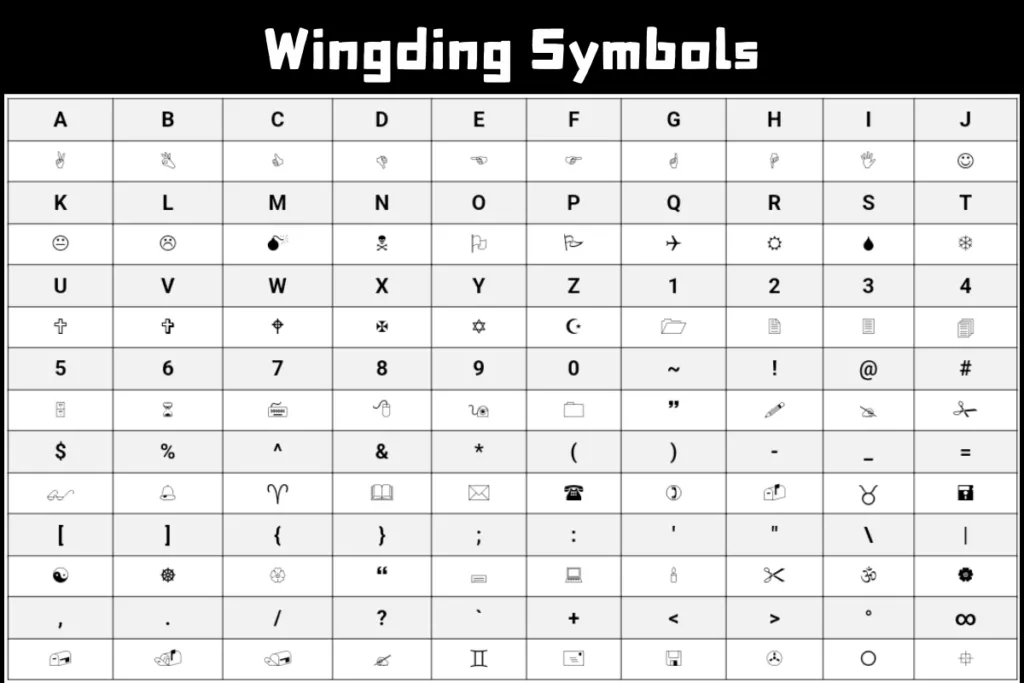
Wingdings is a dingbat font created for Microsoft Windows.
A dingbat font replaces regular letters and numbers with symbols instead of standard alphabet characters.
For example:
- typing “A” may display a symbol
- numbers may appear as icons
- punctuation transforms into decorative graphics
The underlying keyboard characters stay the same, but the font changes how they appear visually.
That’s why Wingdings became known as a symbol font rather than a language.
Why Microsoft Needed Wingdings
The answer to Why Wingdings font originally created comes down to usability and visual communication. Microsoft wanted users to have quick access to symbols without needing separate graphics software. At the time, desktop publishing was becoming more popular. Businesses, schools, and home users were creating:
- newsletters
- flyers
- reports
- invitations
- presentations
People wanted visual elements inside documents, but inserting graphics was much harder than it is now.
Wingdings solved that problem by turning keyboard characters into instant symbols.
Instead of drawing icons manually, users could:
- switch the font
- type characters
- instantly display symbols
That was genuinely useful in early office software.
The Designers Behind Wingdings
The history gets even more interesting when you look at the creators.
Wingdings was developed by typographic designers:
- Charles Bigelow
- Kris Holmes
These designers were already respected in digital typography circles before Wingdings became famous.
Their work focused heavily on:
- font creation
- screen readability
- computer typography
- digital font systems
Microsoft later distributed Wingdings widely through Windows and Microsoft Office, which is why millions of users suddenly had access to it. The font quickly became one of the most recognizable symbol fonts ever made.
The Meaning Behind the Name “Wingdings”
The word “wingding” actually existed before the font.
Historically, “wingding” referred to:
- a lively party
- something flashy or unusual
- decorative elements
The font name matched its playful and symbol-heavy style.
It wasn’t meant to sound serious or technical. And honestly, that playful identity helped people remember it.
How Wingdings Worked Technically
Part of understanding Why Wingdings font originally created involves looking at how fonts worked during that era.
Every keyboard character has a code.
Standard fonts display:
- A as A
- B as B
- C as C
Wingdings reassigned those codes to symbols.
For example:
- A could become a hand icon
- B might display an arrow
- C could show a symbol
This process is called:
- character substitution
- symbol character mapping
- font encoding
It allowed users to generate visual icons directly from their keyboards.
At the time, that was pretty clever.
Why Symbol Fonts Were Useful in Microsoft Word
Microsoft Word played a huge role in Wingdings becoming popular.
People used the font for:
- decorative bullets
- visual dividers
- office symbols
- presentation graphics
- instructional documents
Back then, inserting graphics wasn’t always smooth or fast. Symbol fonts saved time.
Need arrows in a document?
Switch to Wingdings.
Need check marks?
Wingdings again.
Need quick icons for a presentation slide?
Still Wingdings.
It became a practical shortcut for document formatting.
Wingdings and the Rise of Desktop Publishing
The late ‘80s and early ‘90s saw huge growth in desktop publishing.
Regular users suddenly gained access to tools previously limited to professional designers.
People started creating:
- brochures
- posters
- flyers
- school projects
- newsletters
Visual design mattered more than ever.
The creation of Wingdings supported that movement by giving users fast access to decorative symbol fonts without requiring advanced graphic design skills.
That explains a major part of Why Wingdings font originally created in the first place.
Why People Thought Wingdings Was Secret Code
This happened mostly because the symbols looked mysterious.
Humans naturally search for meaning in visual patterns. When people saw rows of strange icons replacing letters, they assumed there might be hidden messages behind them.
Then internet culture amplified the mystery.
Certain word combinations produced symbol patterns that looked oddly dramatic, and conspiracy theories spread online. Most were coincidences or exaggerated interpretations.
The truth is simpler:
Wingdings was designed for visual typography, not secret communication.
Wingdings Was Never Intended as a Language
This is one of the biggest misconceptions online.
Wingdings is not:
- a spoken language
- an encrypted system
- a hidden code
- a symbolic writing system
It’s simply a decorative font.
The symbols don’t carry structured grammar or vocabulary rules. They’re visual substitutions tied to keyboard characters.
That distinction matters when discussing Why Wingdings font originally created because Microsoft’s goal was practical document styling, not communication theory.
Why Wingdings Became So Popular
A few reasons helped Wingdings explode in popularity.
It Came Preinstalled
Millions of Windows computers included it automatically.
It Was Easy to Use
Users only needed to switch fonts.
The Symbols Felt Fun
The icons looked playful and unusual.
Early Internet Culture Loved Weird Things
Honestly, the internet has always loved strange little discoveries.
People experimented constantly with fonts, hidden-looking messages, and quirky formatting tricks.
Wingdings fit perfectly into that culture.
The Difference Between Wingdings and Modern Emojis
You can think of Wingdings as an early ancestor of modern emoji systems in some ways.
Both use visual symbols for communication and decoration.
But technically they work differently.
Wingdings
- font-dependent
- uses character substitution
- tied to specific font rendering
Emojis
- Unicode standardized
- supported across devices
- platform independent
Back when Wingdings was created, Unicode support wasn’t as advanced as it is now.
That’s another important clue for understanding Why Wingdings font originally created during that specific era of computing.
Wingdings in Microsoft Office Culture
For a while, Wingdings became part of office culture itself.
People used it for:
- memos
- forms
- classroom worksheets
- bulletin boards
- presentation slides
Teachers especially loved symbol fonts because they helped create visually engaging materials quickly.
Even now, some educators still use symbol-based formatting in worksheets and printable activities.
You’ll sometimes find creative education websites combining typography tools, printable games, and places where users can also download 20+ dinosaur coloring pages for kids. That mix of fonts and educational content still exists online.
Problems With Wingdings
Even though the font became iconic, it had limitations.
Compatibility Issues
Not every device displayed symbols correctly.
Accessibility Problems
Screen readers struggled with symbol-heavy text.
Confusing Outputs
Long Wingdings text became unreadable quickly.
Font Dependency
Without the font installed, symbols could appear broken.
These limitations became more noticeable as internet communication evolved.
Why Wingdings Still Exists Today
Despite its age, Wingdings never fully disappeared.
People still search for:
- retro typography
- symbol fonts
- decorative icons
- vintage computer aesthetics
There’s also nostalgia involved.
Older users remember discovering Wingdings during the early days of Windows. Younger users often find it through meme culture or symbol generators online.
That ongoing curiosity keeps the font alive.
The Influence of Wingdings on Digital Design
Wingdings influenced later design systems more than many people realize.
It helped normalize:
- visual icon communication
- symbol-based typography
- icon fonts
- graphical text styling
Modern design systems now rely heavily on icons everywhere:
- apps
- websites
- operating systems
- social media platforms
Wingdings wasn’t the direct cause of all that, obviously, but it represented an early mainstream example of symbol-heavy interface design.
Why People Still Search for Wingdings Fonts
Many users looking for <a href=”#”>wingdings fonts</a> aren’t trying to decode mysteries.
Most are interested in:
- decorative typography
- retro aesthetics
- symbol generators
- creative document styling
- visual experimentation
There’s something entertaining about transforming ordinary text into strange icons instantly.
Even if it feels outdated sometimes, the font still has personality.
Was Wingdings Successful?
Absolutely.
From Microsoft’s perspective, Wingdings achieved exactly what it was supposed to do:
- provide easy symbol access
- support desktop publishing
- improve document styling
- add visual flexibility to Windows software
The fact that people still discuss it decades later says a lot.
Most fonts disappear quietly.
Wingdings became part of internet history.
Final Thoughts
So, Why Wingdings font originally created by Microsoft?
The answer is surprisingly practical. Microsoft needed a symbol-based font that helped users insert icons, decorative graphics, and visual markers into documents during the early growth of desktop publishing. At a time when graphics tools were more limited, Wingdings offered a quick way to create visually interesting documents using simple keyboard input.
It wasn’t designed as a secret code, hidden language, or internet mystery. It was a typography solution built for usability and creative formatting.
Still, the strange symbols, playful appearance, and internet rumors gave the font a second life far beyond its original purpose. That’s why people still search for Wingdings today, whether they’re experimenting with symbol generators, browsing retro design ideas, testing typography tools, or downloading 20+ dinosaur coloring pages from creative websites that somehow bundle all these things together.