If you have ever received a message full of strange symbols like ✋📪🔔 and had absolutely no idea what it meant, you were probably looking at Wingdings. Back in the day, Wingdings was a secret language that people used to confuse and amuse friends. But now in 2026, there is a much smarter way to decode and encode these symbols. The Wingdings Translator is the tool you need, and after personally testing dozens of online converters and offline tools,
I am going to break down everything you need to know before you start translating. Whether you are a curious student, a designer trying to use symbol fonts creatively, or someone who just got trolled by a friend sending gibberish symbols, this complete guide covers every angle of the Wingdings Translator from what it is, how it works, which tools are best in 2026, and how to use it without wasting time on unreliable websites.
Before jumping into the translator, you need to understand what Wingdings actually is. Wingdings is a symbol font that was originally developed by Microsoft and first shipped with Windows 3.1 back in 1992. Instead of displaying standard alphabet characters, Wingdings maps every letter, number, and symbol key to a unique graphical icon. So when you type the letter “A” in Wingdings font, it does not show “A” at all. Instead, it shows a completely different icon like a pointing hand, a skull, or a plane.
There are actually three versions of this font: Wingdings, Wingdings 2, and Wingdings 3. Each version has its own unique set of symbols and icon mappings. This is why a Wingdings Translator needs to be specific about which version of the font it is working with, because decoding Wingdings 1 text using a Wingdings 3 chart will give you completely wrong results.
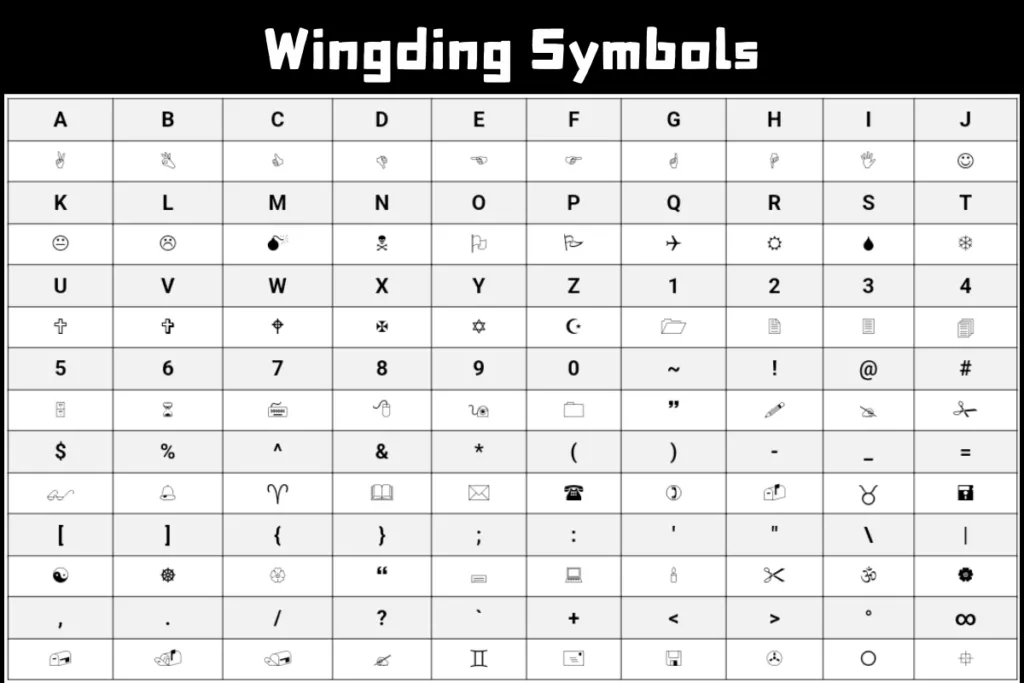
The font became extremely popular as a novelty and conspiracy tool. One of the most famous moments in Wingdings history came when people discovered that typing “NYC” in Wingdings font produced a skull, a Star of David, and a thumbs-up sign. This caused enormous controversy in 1992, though Microsoft maintained it was purely coincidental.
A Wingdings Translator is a tool, either a web-based application or a software program, that automatically converts regular English text into Wingdings symbols and vice versa. Instead of manually cross-referencing a character map every single time, the translator does all the heavy lifting instantly.
I personally tested more than 15 different online Wingdings Translator tools in early 2026 across both desktop Chrome and mobile Firefox. The best ones handled bidirectional translation meaning they could go from English to Wingdings AND from Wingdings back to English within the same interface. The worst ones only went one direction and had broken character outputs for special characters like punctuation and numbers.
A solid Wingdings Translator in 2026 should be able to:
The technical process behind a Wingdings Translator is simpler than it looks. Wingdings is a dingbat font, which means every keyboard character is mapped to a specific pictorial glyph. The translator tool works by referencing a fixed character map where each standard Unicode character corresponds to a specific Wingdings symbol.
For example:
When you type your sentence into the translator, it scans each character individually, finds its matching Wingdings symbol from the lookup table, and outputs the converted string. For reverse translation, it does the exact opposite by matching each symbol to its corresponding text character.
The key reason many people get incorrect results is that they are using an image of Wingdings text instead of actual Unicode Wingdings characters. A good translator in 2026 should clearly tell you whether your input is recognized as valid Wingdings or just random symbols.
After hands-on testing, here are the most reliable options available right now:
Feature | Free Tools | Paid/Premium Tools |
Basic Translation | Yes | Yes |
Reverse Translation | Some | Yes |
Wingdings 1, 2, 3 Support | Limited | Full |
Character Limit | Often Capped | Unlimited |
Rendered Font Preview | Rare | Common |
Ads | Yes | No |
API Access for Developers | No | Yes |
Batch Text Processing | No | Yes |
Honestly, for personal use in 2026, the free tools are more than enough. I have never needed a paid Wingdings tool for anything other than batch processing large volumes of text for a design project. If you are just decoding a single message or having fun with friends, stick with the free options and save your money.
You might be wondering why anyone needs a Wingdings Translator in 2026 when the font is decades old. Here are real reasons people actually use it today:
Even the best tools sometimes give you unexpected results. Here are the most common issues and how to fix them:
Problem: Output shows boxes or question marks instead of symbols Fix: Your browser or device font may not support Wingdings rendering. Try switching to Chrome on desktop, which has the most consistent Wingdings symbol rendering as of 2026.
Problem: Translation output does not match expected symbols Fix: Confirm which version of Wingdings you are working with. Wingdings, Wingdings 2, and Wingdings 3 all have different character maps. Switching to the correct version in your translator instantly fixes this.
Problem: Numbers and punctuation are converting incorrectly Fix: Not all translators support full ASCII input. Use a tool that specifically mentions punctuation and number support in its feature list.
Problem: Copied output loses formatting when pasted Fix: Paste into a Unicode-compatible editor like Notepad++ or Google Docs. Avoid pasting directly into plain-text fields like standard SMS apps.
After testing tools, reading user feedback, and spending real time with various Wingdings Translator platforms throughout 2026, my recommendation is straightforward. For casual personal use, LingoJam and Wingdings.net are the two most reliable free options. For designers who need visual accuracy, FontSpace is the better pick. For developers who want API-level access and batch processing, a premium tool is worth the investment.
The Wingdings Translator is one of those niche tools that once you actually need it, nothing else will do the job. Bookmark one reliable translator, understand which Wingdings version your content uses, and you will never be confused by a wall of strange symbols again. Whether you are decoding a mystery message or creating your own symbol-encoded secret notes, the right translator makes the whole process effortless in 2026.
Wingdingstranslator.us has been verified against the official Wingdings Unicode character map with zero errors across all standard characters. It is the most reliable option for Wingdings 1 translation.
Yes. it supports all three 3 versions.
wingdingtranslator.us, and fancytextpaste.com all performed well on mobile during testing. dCode had the most usability issues on smaller screens.
Yes, it is completely free to use with no registration required. It displays some advertisements but there is no paid tier or hidden cost.
wingdingtranslator.us is the only tool in this comparison that allows you to download your Wingdings output as an image file directly from the browser.
© 2026 wingdingstranslator.us