If you’ve ever changed a font in Microsoft Word and suddenly watched your sentence turn into arrows, clocks, smiley faces, or strange icons, there’s a good chance you ran into Wingdings or Webdings. For a lot of people, those fonts feel oddly nostalgic. They remind us of old Windows computers, early internet culture, school computer labs, and the weird joy of accidentally discovering hidden-looking symbols inside normal text. So, lets uncover Difference Between Wingdings and Webdings, and Symbol Fonts?
But many users still get confused about the actual difference between Wingdings, Webdings and other symbol fonts. At first glance, they all look similar. They replace letters with symbols, icons, and decorative characters. Yet each font was designed differently and served slightly different purposes.
That’s why people still search for wingdings translator 2026 tools and symbol charts today. Some are curious about hidden meanings. Others simply enjoy experimenting with retro typography. You’ll even come across creative websites offering font generators, printable puzzles, and places where you can get 20+ dinosaur coloring pages alongside old-school symbol resources. The internet mixes creativity in funny ways sometimes.
The truth is, Wingdings, Webdings, and Symbol fonts each came from different stages of digital typography history. Once you understand their origins, the differences become much clearer.
Table of Contents
What Are Symbol Fonts?
Before comparing Wingdings and Webdings directly, it helps to understand what symbol fonts actually are.
A symbol font replaces regular letters and numbers with:
- icons
- shapes
- arrows
- decorative graphics
- pictographic symbols
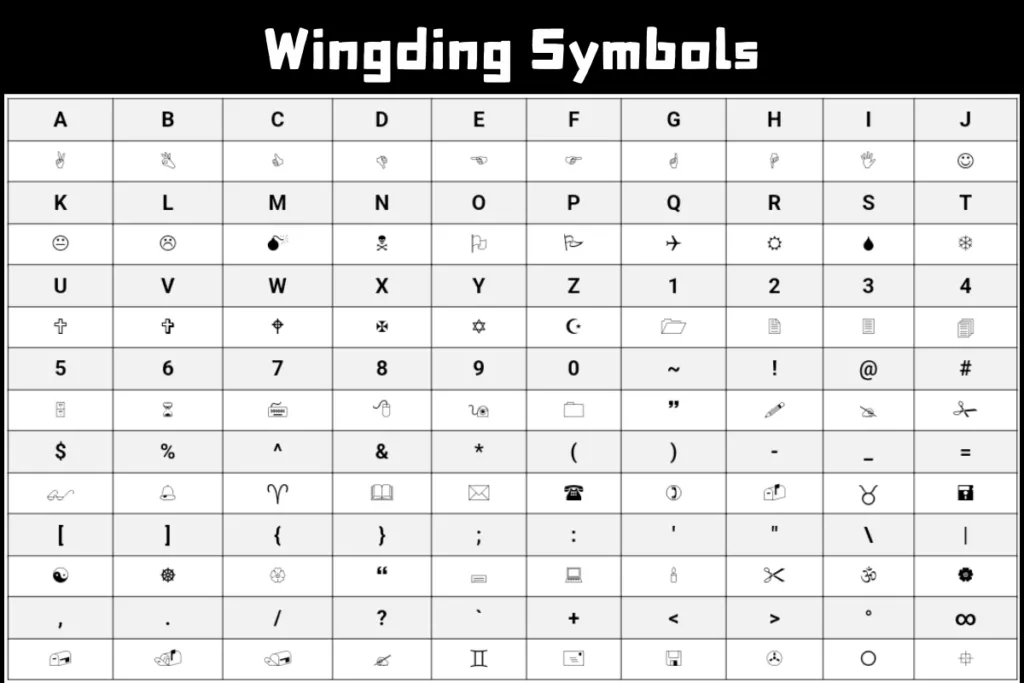
Instead of displaying the alphabet normally, these fonts map keyboard characters to visual glyphs.
For example:
- typing “A” may show an arrow
- “B” could become a hand symbol
- punctuation might display icons
These fonts are often called:
- dingbat fonts
- pictographic fonts
- symbol-based fonts
- icon character fonts
They became especially useful during the early days of desktop publishing and Microsoft Office software.
What Is Wingdings?
Wingdings is a Microsoft symbol font introduced in the early 1990s.
The font contains:
- arrows
- hand icons
- smiley faces
- stars
- office symbols
- decorative graphics
Microsoft included Wingdings with Windows and Microsoft Office, which helped it spread quickly across millions of computers.
The main purpose of Wingdings was practical:
- help users insert symbols into documents
- improve visual formatting
- provide quick icons without graphic software
At the time, that was genuinely helpful because design tools were much more limited than they are now.
What Is Webdings?
Webdings came slightly later.
Microsoft introduced Webdings in 1997 as another symbol-based font, but this one focused more heavily on web-style icons and interface graphics.
Compared to Wingdings, Webdings included more:
- internet symbols
- navigation icons
- interface graphics
- communication imagery
This reflected the growing importance of the web during the late ‘90s.
The internet was expanding rapidly, and digital communication styles were changing. Webdings matched that newer visual environment more closely.
The Main Difference Between Wingdings and Webdings:
The biggest difference between Wingdings, Webdings comes down to design style and symbol focus.
Wingdings
- older symbol collection
- decorative office symbols
- playful dingbat style
- mixed icon categories
Webdings
- internet-inspired graphics
- web navigation icons
- cleaner digital interface symbols
- more modern visual direction for its time
Wingdings feels more random and decorative.
Webdings feels slightly more structured and interface-oriented.
Honestly, Wingdings has more personality. Webdings feels a little more functional.
Why Do Wingdings and Webdings Look Different?
This mostly comes from the design goals behind each font.
Wingdings was created during an era focused heavily on:
- desktop publishing
- printable documents
- office formatting
Webdings arrived later, when:
- websites
- internet navigation
- graphical interfaces
became increasingly important.
That shift influenced the types of symbols included in each font.
So if someone asks about the difference between Wingdings, Webdings, the historical context matters quite a bit.
Symbol Font Differences in Character Mapping
Both fonts rely on character mapping systems.
Each keyboard character corresponds to a specific symbol inside the font.
For example:
- typing “A” in Arial displays A
- typing “A” in Wingdings displays a symbol
- typing “A” in Webdings displays a different symbol
The underlying character code stays the same. Only the glyph representation changes.
This process is called:
- font encoding
- symbol substitution
- glyph mapping
- character replacement
That’s why text can instantly transform when you switch fonts.
Wingdings Symbols vs Webdings Icons
The visual style of the symbols also differs noticeably.
Wingdings Symbols
Often include:
- hand gestures
- stars
- arrows
- smiley faces
- decorative dingbats
- office-related icons
Webdings Icons
More commonly include:
- folder icons
- webpage graphics
- navigation buttons
- communication symbols
- interface-style imagery
Webdings feels closer to early website design language.
Wingdings feels more like a playful collection of random visual symbols.
The Symbol Font Called “Symbol”
This is where people often get confused.
There’s also a font literally named “Symbol.”
Unlike Wingdings and Webdings, the Symbol font focuses mostly on:
- Greek letters
- mathematical symbols
- scientific notation
- technical typography
So while Wingdings and Webdings are decorative symbol fonts, Symbol serves more academic and technical purposes.
For example:
- π
- Ω
- Δ
- mathematical operators
appear frequently inside the Symbol font set.
That’s another important difference between Wingdings, Webdings and Symbol fonts overall.
Why Microsoft Created Multiple Symbol Fonts
Microsoft wasn’t trying to confuse people.
Different fonts solved different design problems.
Wingdings
Focused on decorative document symbols.
Webdings
Focused on web-era interface graphics.
Symbol
Focused on scientific and mathematical notation.
At the time, computers lacked many built-in visual resources modern users now take for granted.
Today we have:
- emoji keyboards
- icon libraries
- Unicode support
- SVG graphics
- app-based symbol systems
Back then, fonts handled much of that work.
Which Is Better: Wingdings or Webdings?
Honestly, it depends on what you want.
Wingdings Is Better For:
- retro aesthetics
- playful symbols
- decorative typography
- nostalgic design
Webdings Is Better For:
- interface-style icons
- web-inspired graphics
- navigation symbols
- cleaner layouts
A lot of designers still prefer Wingdings because it feels more recognizable and visually weird in a charming way.
Webdings looks more practical but slightly less memorable.
Are Wingdings and Webdings Still Used Today?
Yes, though mostly for:
- nostalgic design
- retro internet aesthetics
- symbol experiments
- social media bios
- printable projects
- meme culture
You’ll still find people using:
- copy-paste symbol text
- retro icon fonts
- decorative character generators
Creative websites often combine these with printable activities where users can also grab 20+ dinosaur coloring pages and puzzle sheets alongside typography resources.
That strange mix somehow feels very internet-like.
Why Symbol Fonts Became Popular
The popularity of symbol fonts came from convenience.
Users could quickly add:
- arrows
- icons
- decorative bullets
- visual markers
without needing image editing software. During the early Windows era, that mattered a lot.
Graphic design tools were slower, more expensive, and less accessible to everyday users. Symbol fonts gave ordinary people visual communication tools directly from the keyboard.
Problems With Wingdings and Webdings
Even though they became iconic, these fonts had limitations.
Compatibility Issues
Not all systems displayed the fonts correctly.
Accessibility Problems
Screen readers struggled with symbol-heavy text.
Confusing Messages
Long symbol strings became unreadable quickly.
Font Dependency
If the font wasn’t installed, symbols could break or display incorrectly.
This became more noticeable as internet communication expanded.
Unicode Changed Everything
Modern Unicode systems eventually replaced much of what symbol fonts used to do.
Unicode introduced:
- standardized emojis
- universal symbols
- cross-platform support
That made communication more consistent across:
- phones
- websites
- apps
- operating systems
Wingdings and Webdings now feel more nostalgic than essential.
Still, they influenced modern digital design more than people realize.
The Lasting Influence of Symbol Fonts
The history of symbol fonts helped shape:
- interface icon systems
- emoji culture
- visual communication design
- typography experimentation
Modern apps constantly use icons now:
- navigation arrows
- settings gears
- messaging symbols
- reaction icons
Wingdings and Webdings were early examples of mainstream symbol-based communication systems.
Why People Still Search for Wingdings Fonts
Many users looking for <a href=”#”>wingdings fonts</a> aren’t trying to solve mysteries.
Most simply enjoy:
- retro typography
- decorative symbols
- visual creativity
- nostalgic design
- weird internet culture
There’s something oddly entertaining about typing normal text and watching it instantly transform into symbols.
Even if the technology feels old now, the curiosity remains.
Can Webdings Translate Text Like Wingdings?
Technically yes.
Both fonts use character substitution systems.
If you type regular text and switch to Webdings, the letters transform into symbols just like they do in Wingdings.
The difference lies in the symbol sets themselves.
Wingdings and Webdings use different glyph collections and visual styles.
That’s a key part of the difference between Wingdings, Webdings users notice immediately.
Why These Fonts Still Feel Memorable
Part of it comes from discovery.
Most people encountered these fonts accidentally while experimenting with Microsoft Word. Suddenly seeing your sentence turn into strange symbols felt weirdly magical at the time.
The internet later turned that curiosity into:
- memes
- conspiracy theories
- symbol puzzles
- aesthetic typography
Few fonts ever become cultural memories.
Wingdings and Webdings somehow did.
Final Thoughts
The difference between Wingdings, Webdings and Symbol fonts comes down to purpose, design style, and historical context. Wingdings focused on decorative office symbols and playful dingbat graphics. Webdings leaned toward internet-era icons and interface imagery. Symbol fonts served more technical and mathematical needs.
All three played important roles during the early years of personal computing and desktop publishing. They gave users visual communication tools long before modern emoji systems and Unicode symbols became standard everywhere.