Wingdings is one of those fonts people never completely forget. Even if you haven’t used it in years, there’s a good chance you still recognize those strange little symbols the second they appear on screen. Arrows, smiley faces, hand gestures, envelopes, stars, telephones, somehow they all became part of internet culture, old Microsoft Word memories, and retro computer nostalgia at the same time. So, lets uncover What Are the Most Commonly Used Wingdings Symbols and Their Meanings?
A lot of people discover Wingdings through memes or online symbol tools, then eventually start wondering about the actual meanings behind the icons. Some symbols seem obvious. Others look completely random until you learn what they were originally designed for.
That curiosity is why searches for Best wingdings translator tools and symbol charts still happen every day. People enjoy decoding the symbols, experimenting with text conversion, and honestly just seeing what weird characters appear. You’ll even find creative websites that combine symbol generators with printable activities where you can get 20+ dinosaur coloring pages alongside retro font resources and puzzles.
The interesting part is that many common Wingdings symbols were originally created for practical office and document use, not internet mysteries. Once you understand the history behind them, the font makes a lot more sense.
Table of Contents
What Is Wingdings?
Wingdings is a symbol-based font developed for Microsoft Windows in the early 1990s. Instead of displaying normal alphabet letters, the font replaces keyboard characters with symbols and pictographic icons.
For example:
- letters become symbols
- numbers display icons
- punctuation transforms visually
The underlying character still exists, but the font changes how it appears on screen. That’s why Wingdings is considered a dingbat font rather than a language.
Why People Search for Wingdings Symbols and Their Meanings
Part of the fascination comes from how mysterious the symbols look.
Rows of icons naturally make people wonder:
- Do these symbols mean something?
- Are they coded messages?
- Why were certain icons chosen?
- Is there a hidden system behind them?
The truth is much simpler than internet rumors suggest. Most Wingdings icons were designed for:
- decorative formatting
- office documents
- visual communication
- quick symbols
- printable graphics
Still, learning about Wingdings symbols and their meanings can actually be pretty fun because the icons reflect an older era of computer design.
The Most Common Wingdings Symbols
Some symbols appear far more often than others. These became recognizable because people used them in:
- Microsoft Word documents
- presentations
- social media bios
- printable worksheets
- retro internet graphics
Here are some of the most commonly used Wingdings characters and what they typically represent.
Arrow Symbols in Wingdings
Arrows are probably the most practical symbols in the entire font.
Common Meanings
- direction
- movement
- navigation
- emphasis
- progression
People used arrow symbols heavily in:
- instructional documents
- flowcharts
- classroom worksheets
- presentations
Even today, arrows remain one of the most useful symbol categories in digital design.
Some Wingdings arrows look simple, while others feel oddly decorative compared to modern minimalist icons.
Honestly, older computer icons had more personality sometimes.
Check Mark Wingdings Symbols
The check mark became one of the most recognizable Wingdings icons ever created.
Typical Uses
- completed tasks
- approval
- confirmation
- checklist formatting
Back in older versions of Microsoft Word, many users inserted check marks through Wingdings because there weren’t as many built-in symbol tools available.
That practical use explains a lot about Wingdings symbols and their meanings overall. Many symbols existed primarily to help organize documents visually.
Smiley Face Wingdings Characters
Before emojis became standard everywhere, Wingdings smiley faces helped people add emotion to digital text.
Common Meanings
- happiness
- friendliness
- humor
- casual tone
Some older internet users still remember using Wingdings smileys in:
- chat rooms
- forums
- emails
- school projects
Modern emojis eventually replaced most of these uses, but the connection between symbols and emotional communication started much earlier than many people realize.
Hand Symbols Wingdings
Hand icons became surprisingly popular because they worked well as visual pointers.
Common Hand Symbol Meanings
- pointing directions
- attention markers
- approval gestures
- warnings
- emphasis
Teachers and office workers often used hand symbols inside printed documents to draw attention to important sections. Some people also used them decoratively in social media bios once copy-paste symbol generators became popular.
Star Symbols Wingdings
Stars always stand out visually, which explains why they became common in typography.
Typical Meanings
- importance
- decoration
- achievement
- highlights
- favorites
Wingdings includes several star variations:
- outlined stars
- filled stars
- sparkle-style icons
These symbols appeared frequently in:
- certificates
- invitations
- flyers
- greeting cards
Telephone Symbol Wingdings
The classic telephone icon reflects an older era of office communication.
Common Uses
- contact information
- office directories
- business forms
- communication labels
It’s funny looking back now because many younger users recognize smartphone icons more easily than traditional phone receiver symbols.
Still, the telephone remains one of the most recognizable Wingdings icons.
Envelope Icon Wingdings
The envelope symbol became associated with:
- messages
- communication
- mailing addresses
Before email icons became standardized across apps and websites, Wingdings envelope symbols helped users visually represent communication inside documents.
This symbol later influenced many digital interface designs people still use today.
Zodiac Symbols in Wingdings
Some Wingdings character sets included zodiac-style symbols and astrology-related icons.
Common Associations
- horoscope themes
- personality signs
- decorative symbolism
- mystical aesthetics
These weren’t necessarily practical office symbols, but they added visual variety to the font collection.
Internet users especially loved experimenting with zodiac symbols during the early web era.
Why Wingdings Symbols Became Popular
The popularity of Wingdings symbols and their meanings came from accessibility.
Millions of Windows computers included the font automatically. That meant ordinary users suddenly had instant access to visual symbols without needing design software.
At the time, that was genuinely useful.
People could quickly add:
- arrows
- stars
- check marks
- icons
- decorative symbols
directly into documents using only their keyboards.
Wingdings and Early Internet Culture
The internet helped transform Wingdings from a practical office font into something more cultural.
People started using the symbols for:
- hidden-looking messages
- meme graphics
- puzzle games
- strange captions
- decorative usernames
Some viral rumors even claimed certain symbol combinations predicted events or contained hidden messages. Most of those stories were exaggerated coincidences, but they made the font feel mysterious.
That mystery still drives interest in Wingdings symbols and their meanings today.
Wingdings Symbol Chart and Character Mapping
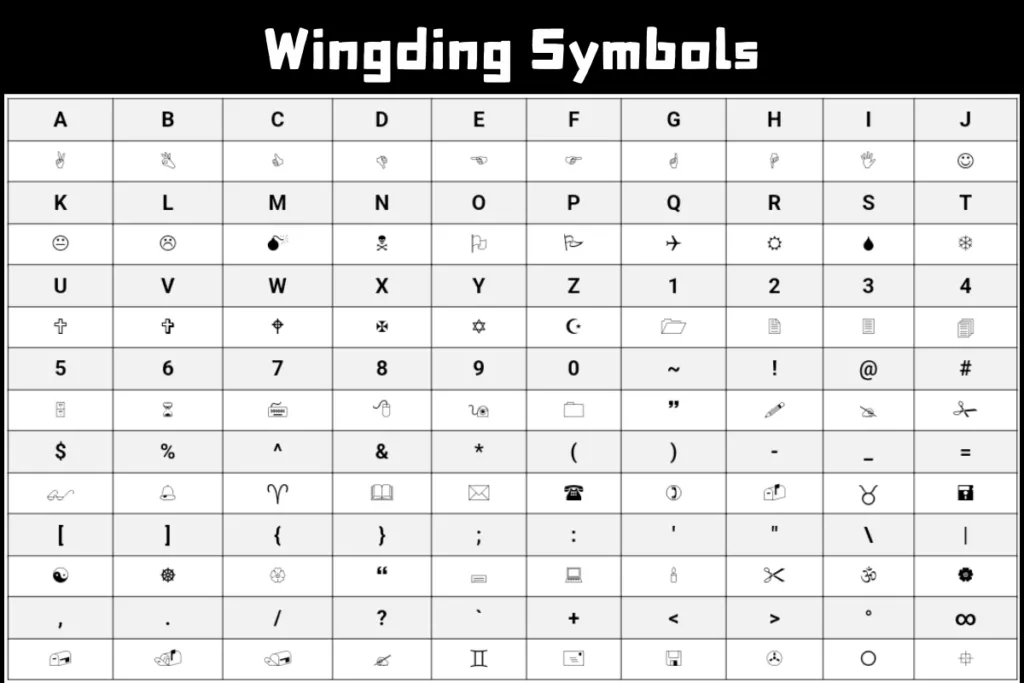
Every Wingdings symbol connects to a keyboard character through character mapping.
For example:
- typing one letter may produce an arrow
- another key might display a star
- numbers can show icons
The process relies on:
- glyph mapping
- symbol substitution
- font encoding
That’s why online tools can:
- convert text to Wingdings
- decode Wingdings symbols
- reverse symbol text
The system is visual rather than linguistic.
Why Some Symbols Feel Outdated
A few Wingdings icons clearly reflect older technology and design trends.
Examples include:
- classic telephone receivers
- floppy disk imagery
- old office-style arrows
- retro hand icons
That older visual style actually contributes to the font’s nostalgic appeal now.
Modern design tends to look cleaner and flatter. Wingdings feels more playful and experimental.
Common Uses for Wingdings Symbols Today
People still use Wingdings symbols regularly in:
- social media bios
- aesthetic posts
- classroom materials
- retro designs
- printable worksheets
- decorative presentations
Creative websites often pair symbol tools with activity downloads where users can also grab 20+ dinosaur coloring pages, printable games, and retro design assets.
There’s a weird overlap between nostalgia, education, and internet creativity that keeps these fonts alive.
Can Wingdings Symbols Be Misunderstood?
Definitely.
Because the symbols aren’t standardized language, people sometimes interpret them differently.
A symbol that looks obvious to one person may seem confusing to someone else.
That’s one limitation of relying heavily on pictographic typography instead of plain text.
Wingdings vs Unicode Symbols
This difference matters if you’re using symbols online.
Wingdings
- font-based
- device-dependent
- older symbol system
Unicode Symbols
- standardized
- cross-platform compatible
- widely supported
Many modern “Wingdings-style” symbol generators now use Unicode alternatives because they display more consistently across apps and devices.
Pros of Using Wingdings Symbols
Visually Interesting
Symbols naturally attract attention.
Good for Decorative Formatting
They work well in creative layouts.
Easy to Access
Many systems still support Wingdings fonts.
Fun for Puzzles and Design
People enjoy experimenting with symbol-based text.
Nostalgic Appeal
Older internet users especially recognize the font instantly.
Cons and Limitations
Compatibility Problems
Some devices may not display symbols correctly.
Readability Issues
Too many symbols become confusing quickly.
Accessibility Concerns
Screen readers may struggle with symbol-heavy content.
Can Feel Outdated
Certain icons reflect older computing styles.
Still, that retro look is part of the charm for many people.
Why People Still Search for Wingdings Fonts
A lot of users looking for <a href=”#”>wingdings fonts</a> aren’t necessarily trying to decode secret messages.
Most simply enjoy:
- decorative typography
- retro aesthetics
- symbol collections
- unusual character styles
- nostalgic computer design
There’s something entertaining about converting ordinary text into visual icons, even decades after the font first appeared.
The Lasting Influence of Wingdings
Wingdings helped normalize visual communication inside digital text long before modern emojis took over.
It showed people that:
- symbols could organize information
- icons could improve readability
- decorative typography could feel expressive
In some ways, modern emoji culture continues ideas that older symbol fonts introduced years earlier.
The technology evolved, but the basic human interest in visual communication stayed the same.
Final Thoughts
The fascination with Wingdings symbols and their meanings comes from a mix of nostalgia, curiosity, and visual creativity. Some symbols were designed for practical office use, like arrows and check marks. Others existed mainly for decoration or playful typography. Over time, internet culture added mystery and personality to the font, which helped keep it alive long after newer symbol systems appeared.
What makes Wingdings memorable isn’t hidden secret coding. It’s the strange charm of turning ordinary text into visual symbols that instantly feel different from normal writing.
Even now, people still search for symbol charts, test online converters, browse retro typography collections, and stumble across creative websites where they can experiment with Wingdings while downloading 20+ dinosaur coloring pages at the same time. Somehow, the internet always finds a way to connect random creative ideas together.
And honestly, that odd little mix of nostalgia and curiosity is probably why Wingdings never completely disappeared.